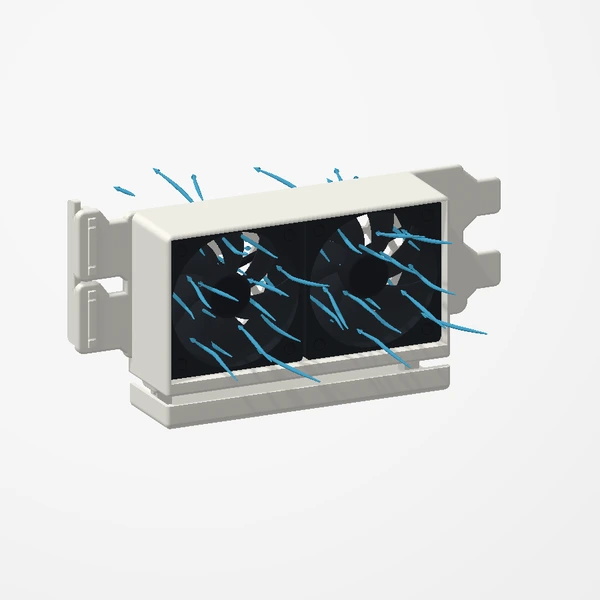
On our PCIe fan mounts, choosing a direction is step one. Get it right first, because turning a fan round later means taking the mount out again.
The basics
What is the difference?
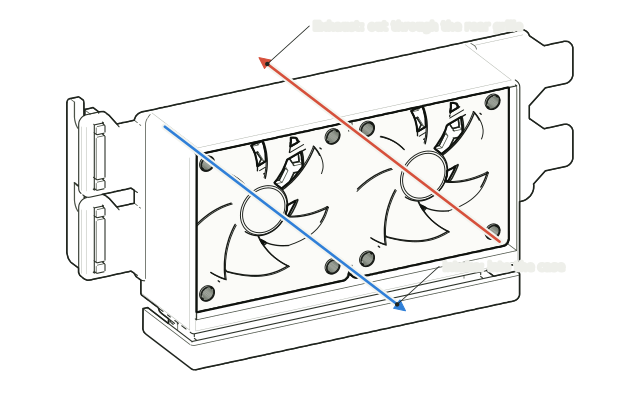
Exhaust pushes warm air out of the case through the mount’s rear grille. Intake draws cool air in through the grille, toward the graphics card above.
How do I tell which way a fan blows?
Most fans have two small arrows moulded into the frame: one for the direction the air moves, one for the way the blades spin. Seat the fan so the airflow arrow points the way you chose.
Choosing a direction
Which one should I pick?
There is no single right answer; it depends on how air already moves through your case. Think about where your other fans push air and where it has to leave. For our 120 mm mount, most people exhaust warm air from behind the card.
Can I compare both in my own PC?
Yes. Keep the workload, case panels, fan settings and room conditions as consistent as you can, note the GPU temperature and fan speed once they settle, then repeat with the fan reversed. That is a suggested method for your own comparison, not a description of our test.
Fitting and results
Are screws included?
No. Fix each fan through its four corner holes with the screws or rubber mounts that came with the fan. The mount itself goes in with the case screws you remove from the slot covers.
What did your test show?
Our tested 2 × 40 mm configuration lowered GPU temperature by 1.5°C and our 1 × 60 mm configuration by 3°C, with less GPU fan noise (not measured in dB). Results vary. The details.
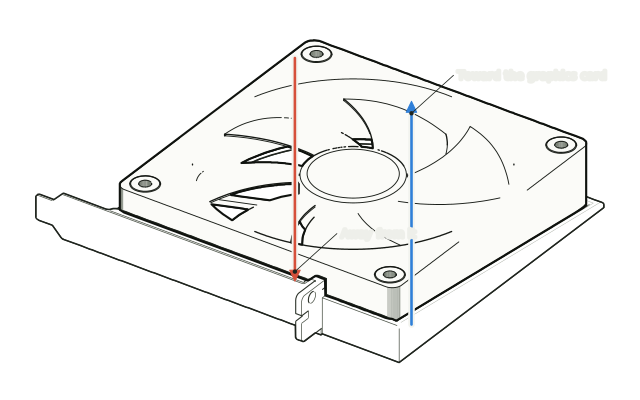
See the airflow views and the full installation.
See the Dual 40 mm mount![The [creations] preview of the dual 40 mm fan mount with its lined wheel and View buttons](/images/workbench/preview-controls-v2.webp)