Software has release notes. So does this website, as of October 2. Here is everything that changed, newest first, in the order you are most likely to notice it.
October 6–7
- Sharper
HD previews
Every view in [creations] and on the design pages now draws from high-resolution frames, so models stay crisp on large and high-density screens, even while they move.
- New
Airflow and installations play by themselves
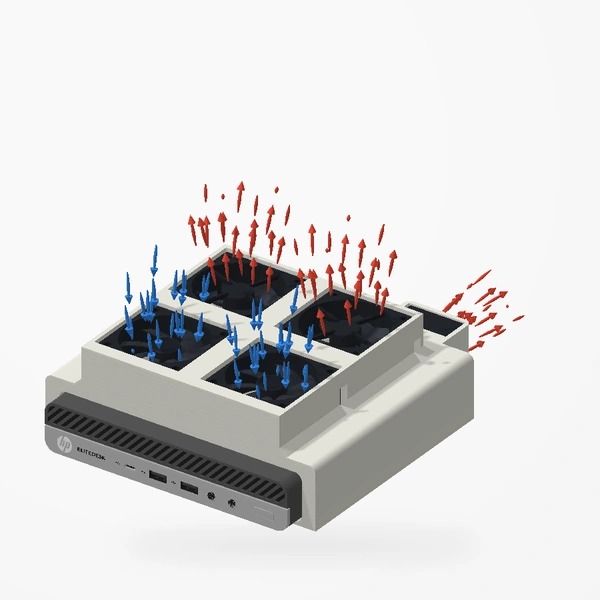
Fan-mount airflow views loop on their own, and installation views play through, pause on the finished build and start again. Drag to scrub; a pause button sits on the stage.
- New
A full-screen step viewer
Tap any drawing in a setup guide to open it full screen, with large Previous and Next buttons, swiping and zoom.
- Improved
Help guides
Each guide shows a picture of its design, links to the design’s page, and on desktop the sidebar becomes the guide’s contents. Search also understands words like return, refund, broken and missing.
- New
Design pages on wide screens
Wide screens get a browse rail with every design on the left and an “On this page” index with previous and next designs on the right.
- Improved
The Workbench
Stories have “In this story” contents, a rail with the designs they mention and previous and next stories, and the index has a compact bar with a chapter menu.
- New
[creations] headers and navigation
Each category in [creations] has its own header, and a parts-bin navigation follows you down the collection: a rail on wide screens, a slim bar on phones and tablets.
October 2
- New
A page for every design
Each design in [creations] has its own page, such as the Dual 40 mm PCIe Fan Mount. Choose a view and drag to rotate or animate it right there, then read the fit checks, illustrated setup steps and care notes underneath.
- New
In stock
Designs on Etsy now carry a small “In stock” label on the collection, the homepage and their pages.
- New
Notify me
Designs not on Etsy yet, like the EliteDesk 800 Mini Fan Mount, have a “Coming soon · Notify me” button. Leave an email and we will tell you when it is available.
- New
Search everything
The search button in the header, Ctrl+K (⌘K on a Mac) or “/” finds designs, setup guides, Help answers, Workbench stories and videos in one place.
- Faster
[creations] opens sooner
The collection now waits only for the first frames it needs and loads the rest quietly in the background. On a typical connection it opens several times sooner, and hover previews stay just as smooth.
- Improved
New installation drawings
Every setup guide uses line drawings traced from our 3D models, one per step. How we draw them.
- Improved
A simpler preview
The quick preview on [creations] is shorter, with a clear “Full details, fit & setup” button. On phones the model now gets most of the screen.
- Redesigned
The Workbench
New layout, twenty new stories, and every older story still here with its original date.
Have a look around the collection.
Open [creations]![The [creations] preview of the dual 40 mm fan mount with its lined wheel and View buttons](/images/workbench/preview-controls-v2.webp)